
Most people don’t think much about their phone charger until something stops working. The original charger gets lost, a cable breaks, or a new phone comes without an adapter in the box. Eventually, many of us end up with a drawer full of chargers and cables collected from different devices over the years.
When it’s time to charge the phone, the decision often comes down to one thing: Does it fit?
Unfortunately, that doesn’t tell you much about whether a charger or cable is actually a good match for your device.
A defective or poorly made charger can cause problems, and damaged or low-quality cables can create problems of their own. At the same time, an inexpensive charger isn’t automatically dangerous, and a powerful 100W charger isn’t automatically too powerful for your phone.
There is a lot of confusion around this subject, so let’s look at what actually matters.
The adapter you plug into the wall isn’t just a connector between the outlet and your phone. It converts high-voltage AC power from the electrical system into the low-voltage DC power your phone can use.
A properly designed charger also regulates its output and includes protection for abnormal electrical conditions such as excessive current, voltage, temperature, and short circuits.
Modern USB-C charging can go a step further. With standards such as USB Power Delivery (USB PD), the charger and device can communicate with each other and determine an appropriate power level.
This is why two chargers with the same USB-C connector can behave very differently.
One might support the charging standard and power level your phone was designed to use. Another might provide only basic USB power. A third might simply be poorly made.
The connector tells you whether something physically fits. It doesn’t tell you everything about what the charger can actually provide.
A slow charger is not automatically a bad charger.
A properly functioning lower-power adapter from a reputable manufacturer can charge a modern phone safely, although it may take considerably longer.
The problem is that many people aren’t using a known, properly functioning older charger. They’re using an adapter that has been sitting in a drawer for years, connected to a cable of unknown age and quality. They may not know who made the adapter, what charging standard it supports, or how much power it can actually provide.
This matters more today because modern USB-C charging is considerably different from the USB charging systems commonly used years ago.
For example, a modern USB-C phone connected to an old USB-A adapter through a USB-A-to-USB-C cable is not using the same charging system as that phone connected to a USB-C Power Delivery charger with an appropriate USB-C cable.
Legacy USB charging and modern USB-C charging use different methods to determine how much power is available. USB Power Delivery provides a more sophisticated system in which compatible devices and chargers communicate and negotiate power.
That doesn’t make every older USB charger unsafe. It does mean that being able to charge a phone and being a good charging solution for that phone are two different things.
If you’ve purchased a current-generation smartphone, it makes sense to use a reputable charger and cable designed to support the charging standards and power requirements of that device instead of relying indefinitely on unknown accessories simply because they fit.
People tend to focus on the power adapter, but the cable is part of the electrical system too.
Every cable has electrical resistance. When current flows through that resistance, some voltage is lost along the cable and some electrical energy is converted into heat.
In simple terms:
Voltage drop = Current × Resistance
The amount of power lost as heat is:
Power loss = Current² × Resistance
This becomes increasingly important as charging current increases.
Cable length, conductor thickness, connector quality, manufacturing quality, corrosion, physical wear, and damage can all affect resistance. That’s one reason two cables that look almost identical can perform very differently.
USB-C cables don’t all have the same capabilities either. Different cables are designed to handle different levels of power and data. Higher-power USB-C applications can also require electronically marked cables that identify their capabilities to the connected equipment.
In a properly functioning USB-C system, the charger and device should respect those limitations. The concern is with worn, damaged, counterfeit, or poorly constructed cables whose actual electrical characteristics may be very different from what they should be.
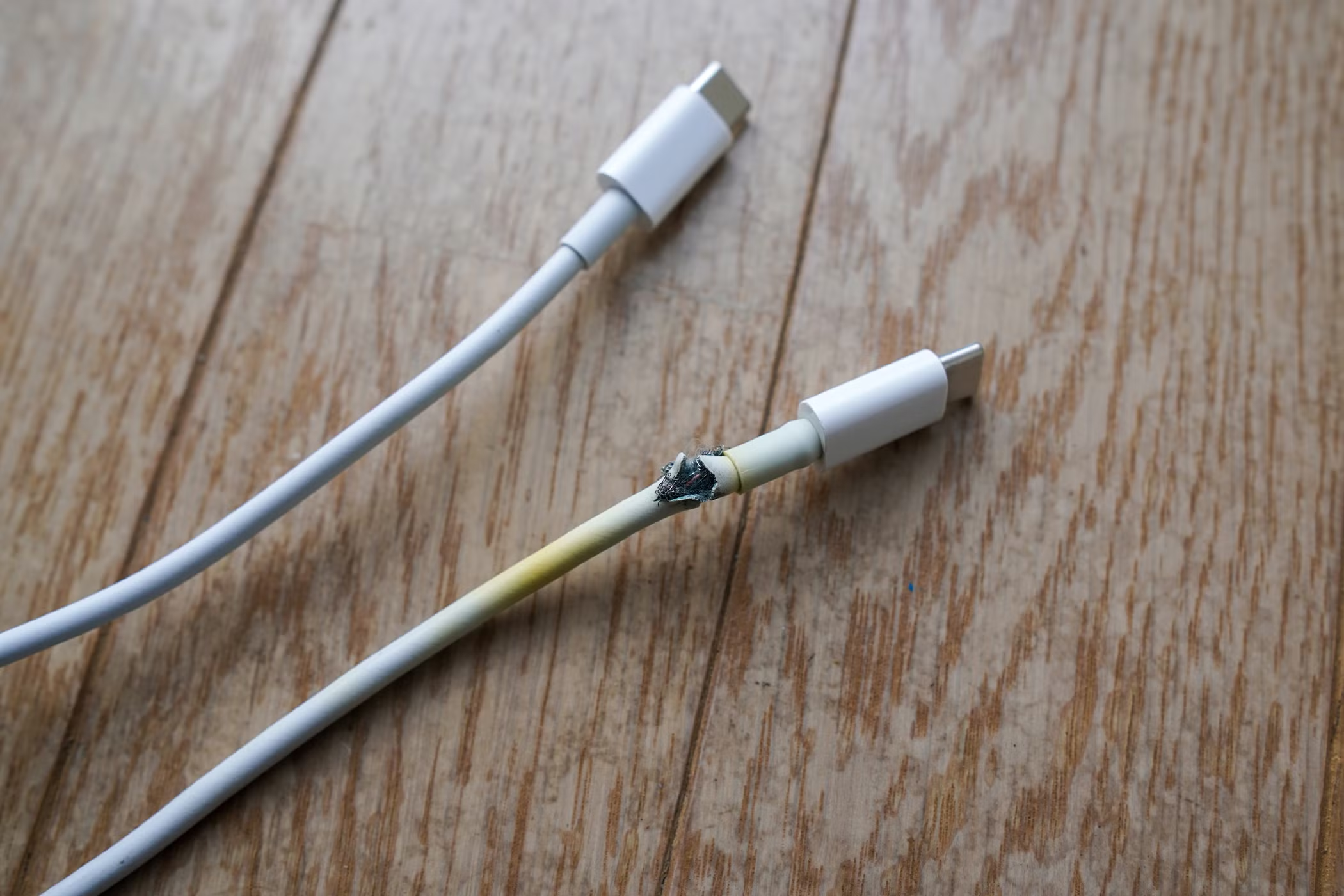
Watch for cables that only work when held at a certain angle, repeatedly connect and disconnect, have loose or damaged connectors, or become unusually hot near either end. If you notice any of those symptoms, replace the cable instead of continuing to use it because it “still works.”
A phone that is already running and a phone with a deeply discharged battery are not necessarily in the same situation.
Before a deeply discharged phone can boot normally, the charging and battery-management systems need to establish suitable conditions and restore enough energy to the battery.
If the charging source, cable, or connection can’t provide stable power under those conditions, the phone may remain apparently dead or take a very long time to show any signs of life.
This is why one of the first things we do when testing a dead phone is connect it to charging equipment that we know is working correctly.
Something We’ve Recently Seen With iPhone 17 Models
We’ve recently had several iPhone 17-series devices brought into Mobile Fix Center that appeared to be completely dead. They would not turn on using the charging equipment their owners had been using.
One thing several of these cases had in common was that the owners weren’t really sure what charger or cable they were using. As long as the connector fit the phone, they assumed the charger was suitable.
When some of these phones were connected to a known-good USB-C Power Delivery source, including MacBook USB-C chargers, they began charging and could eventually be powered back on.
We want to be careful about what that means.
It does not prove that the customers’ chargers caused the phones to become unresponsive. Determining that would require diagnosing each case individually. What it does show is that the charging equipment matters when troubleshooting a phone that appears completely dead.
Before assuming that a modern phone has failed, it should be tested with a known-good charger and cable capable of providing the power the device expects.
This is probably one of the most common misconceptions about phone charging.
Let’s say your phone normally charges at 20, 25, or 30 watts and you connect it to a 100W USB-C laptop charger. Does the charger push 100 watts into the phone?
No.
With a properly functioning USB Power Delivery system, the charger advertises the power configurations it can provide and the connected device requests a supported configuration.
The 100W rating tells you what the charger is capable of supplying. It doesn’t mean that every device connected to it receives 100 watts.
This is why a good USB-C laptop charger can also safely charge many phones, tablets, headphones, and other lower-power USB-C devices.
That doesn’t necessarily mean you’ll get the fastest possible charging speed. Manufacturers support different charging technologies and power profiles. A charger can safely charge your phone without supporting its fastest charging mode.
In that case, the phone generally charges more slowly. It doesn’t receive excessive power simply because the charger has a higher maximum wattage.
Everything we’ve discussed so far assumes that the charger is functioning as intended.
A defective or poorly designed charger is different.
A quality power adapter needs proper voltage regulation, electrical isolation, thermal management, and protection against abnormal conditions. Poorly manufactured chargers may use inferior components or have inadequate protection.
This is where the quality of the product becomes important.
Price alone isn’t a reliable measurement. There are reasonably priced chargers from reputable manufacturers that work perfectly well. An expensive charger isn’t automatically better either.
Instead, look for an identifiable manufacturer, clear electrical specifications, appropriate safety certifications, and support for the charging standards your device uses.
You should stop using an adapter if it has damaged housing or prongs, smells burned, makes unusual electrical noises, repeatedly interrupts charging, or becomes excessively hot.
Sometimes there is nothing wrong with the charger. The problem is at the other end of the cable.
Modern phones can detect moisture in the charging connector and may temporarily disable wired charging. If your phone gives you a moisture or liquid warning, don’t ignore it.
Applying power while moisture is present can contribute to corrosion of the electrical contacts and may eventually cause permanent charging or connectivity problems.
Let the connector dry according to the phone manufacturer’s instructions. Repeatedly unplugging and reconnecting the charger to see whether the warning has disappeared isn’t a good solution.
You should also avoid trying to clean a wet charging port with a needle, paperclip, SIM-eject tool, or another metal object. The contacts inside modern charging ports are small and easy to damage.
We regularly see customers who have already purchased several cables because their phone won’t charge reliably.
The first cable stops working, so they replace it. The second one also seems loose. Eventually, every cable has to be pushed or held at an angle before the phone starts charging.
At that point, buying another cable probably isn’t going to solve the problem.
Pocket lint and other debris can accumulate inside a charging port. Eventually, the connector may no longer insert completely, even though it looks like it’s plugged in.
People often compensate by pushing the cable harder or moving it from side to side. That can make things worse and potentially damage the connector.
Charging ports can also develop worn, bent, contaminated, corroded, or physically damaged contacts.
A simple way to narrow down the problem is to try more than one known-good cable. If one cable has a problem and the others work normally, suspect the cable. If several known-good cables all behave the same way, the phone itself deserves a closer look.
Be careful when cleaning the port yourself. Damaging the connector while trying to remove debris can turn a simple cleaning into a charging-port repair.
Wireless charging gets rid of the cable connection, but it doesn’t eliminate every charging concern.
Heat is one of the main considerations.
Wireless charging transfers energy between coils in the charger and the phone. The process isn’t perfectly efficient, so some energy is lost as heat.
Some warmth is normal. Modern phones monitor temperature and can reduce charging speed or temporarily stop charging if the device becomes too hot.
Alignment also matters. If the phone isn’t positioned correctly over the charging coil, efficiency can decrease. Thick or unsuitable cases can interfere with charging as well.
Foreign objects are another concern, especially metallic objects between the phone and charging surface. They can interfere with charging and may become hot.
Keep coins, keys, metal accessories, and other objects away from the area between the phone and wireless charger.
If the phone becomes excessively hot, repeatedly stops charging, or displays temperature warnings, don’t simply assume that’s normal wireless-charging behavior.
A car charger operates in a different electrical environment from a wall charger.
A vehicle’s electrical system can experience voltage variations and electrical transients related to engine starting, alternator operation, and switching electrical loads. Automotive electronics are designed with these conditions in mind.
A properly designed car charger converts the vehicle’s electrical supply into the regulated USB power expected by your phone and includes appropriate protection.
This is another situation where product quality matters.
That doesn’t mean inexpensive car chargers routinely damage phones. A properly designed car charger should handle the automotive electrical environment correctly.
The concern is with poorly designed or defective adapters that may not provide the regulation and protection they should.
You don’t need to buy the most expensive car charger available, but using an unknown adapter with questionable specifications just because it costs a few dollars isn’t something we’d recommend for an expensive modern smartphone.
A smartphone’s charging system is much more complicated than the charging port.
Different circuits may be involved in detecting the charger, negotiating power, regulating voltage, charging and monitoring the battery, monitoring temperature, protecting the device, and distributing power throughout the phone.
That means charging problems can have many causes.
It might be the adapter or cable. It might be debris or damage inside the charging port. It could involve moisture, corrosion, the battery, or an internal electrical fault.
A phone that doesn’t charge does not automatically have a failed charging IC or logic board.
Those conclusions should come after proper testing and diagnosis.
Internal electrical damage is possible, particularly when there has been liquid exposure, physical damage, or an electrical fault. The important part is identifying the actual failure instead of guessing based on the symptom.
Start with the simple things and change one variable at a time.
Inspect the charger and cable first. Don’t use anything that is visibly damaged, frayed, burned, loose, or abnormally hot.
Next, try a known-good cable. If the problem disappears, you’ve probably found the cause.
If it doesn’t, try a known-good charger. For a modern USB-C phone, use a reputable USB-C charger capable of providing the power expected by the device rather than relying only on an old adapter of unknown specification.
Look at the charging port for obvious debris, moisture, or physical damage, but don’t force anything into it.
Pay attention to warnings displayed by the phone. Moisture alerts, temperature warnings, accessory messages, and repeated charging interruptions can provide useful clues.
Most importantly, look for consistency. If several known-good chargers and cables produce exactly the same symptoms, there’s a good chance the problem isn’t your charger anymore.
Yes. Defective chargers, damaged cables, poor electrical connections, moisture, and improperly constructed charging equipment can all create real problems.
But the answer isn’t as simple as avoiding inexpensive chargers or buying the highest-wattage adapter you can find.
A good 65W or 100W USB-C charger can safely charge a phone that requires much less power. An older low-power adapter can also be perfectly functional. The important differences are the charger’s design, condition, supported charging standards, available power, and the quality and condition of the cable connected to it.
If you have a modern smartphone but you’re still using an assortment of old adapters and cables collected over many years, take a few minutes to find out what you’re actually using.
A connector fitting into your phone doesn’t necessarily mean the entire charging setup is a good match for it.
If your phone isn’t charging correctly after you’ve tried a known-good charger and cable, don’t keep buying accessories hoping that the next one will fix it.
At Mobile Fix Center, we diagnose charging problems on phones, tablets, laptops, and other electronic devices. Sometimes the problem is nothing more than debris in the charging port. Other times it’s a damaged connector, worn battery, corrosion, or an internal electrical fault.
Finding out what’s actually wrong is usually much cheaper than guessing.